Interactive Magazine Archive
Grand Designs (GD)
Viz Magazine (VZ)
Star Trek
Fortean Times (FT)
- Dual delivery options: CD-ROM / DVD.
- MacOS X / Windows 2000 / Windows XP / Windows Vista compatible. Linux / Unix on request.
- The interactive document archive software core is the highly flexible and powerful SDS Caxton document management database system.
- The document handling core is the de facto industry standard Adobe Portable Document Format (PDF).
- Source documents can be digital or hardcopy.
- A document can be a magazine (which is the typical case), journal, catalogue, book, brochure or loose leaf page.
- An archive contains at least one document. There is no theoretical limit on the number of documents that can be stored in an archive but, if the archive is to be delivered on a single CD-ROM, 12-24 documents is typical.
- Digital documents can be in any major DTP format (e.g. InDesign, Quark), or in any image format (e.g. TIFF, JPEG) at 300 dpi or greater.
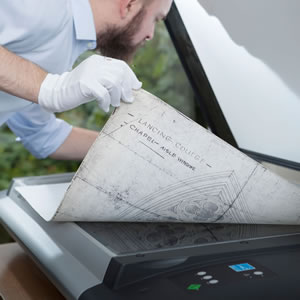
- Hardcopy documents are scanned to the highest standard with close attention to fidelity of reproduction. Facsimiles of damaged documents can be digitally repaired. Facsimiles of colour faded documents can be digitally restored.
- All scanned hardcopy documents are subjected to an OCR process to extract text content. Such text is stored in an invisible layer beneath the page image, closely matched to the font size, style and face of the original document.
- Documents are individually accessed via a Contents index that, as its name suggests, lists the table of contents of the original magazine. If the original document does not have a table of contents, then some other method of access, typically image-based is used.
- Document tables of contents can be split into "sections", or some similar functional equivalent. Documents in the same archive do not have to be split into the same sections.
- Documents can also be accessed via specific "Find", "Search" and "Index" tools. Not all of these might be appropriate for all archives.
- All the words in a document are indexed for rapid search. Customisable stop-lists allow the customer to exclude searches on particular words. For example, the standard stop-list prevents the user searching for words like "the", "a", "and", etc.
- A "Find" dialog allows the user to quickly search for a given word or phrase in the currently open document.
- A "Search" dialog allows the user to search all documents in the current archive for a given word or phrase. Search results are displayed in an easy-to-use dialog that mimics the way that the user access files within folders on Mac OS, Windows, Linux and other operating systems.
- Inclusion of the "Find" and "Search" tools requires no specific data analysis and these are usually included as a matter of course. The "Index" tool is more specialist, although it is sometimes relatively simple to incorporate. Conversely, inclusion of the "Index" tool sometimes requires a detailed lexical analysis of the entire text content of the archive and the terminal stage of such an analysis is an intensive and specialist task that adds high value for the user.
- Document pages can be printed. The Caxton software closely integrates with the host operating system's Print Manager so the user has access to all the print selections, features, properties and devices with which they are already familiar and in a format with which they are already familiar.
- The document page viewing area automatically configures itself to make best use of the user's monitor size and resolution. Within that area pages can be zoomed, panned and scrolled.
- Where an archive contains documents that contain advertising material then a custom Advertisers index is included such that the user can quickly find a particular advertisement and can link from that advertisement to the advertisers published website URL or email address. The general facility is such that all website URLs and email addresses in commissioned advertisements larger than ¼ page are linked; one website URL or one email address in any other advertisement is linked. Classified advertisements can also be included by prior arrangement.
- The Caxton software is fully customisable. Bespoke elements can be added on request, subject to agreement of specification.
- The Caxton software interface is modular. Although most Caxton products follow typical layouts these are simply layouts that have been found to suit the majority of clients' and users' needs and requirements. Consequently, other configurations are entirely possible!
Back-Issue Archive Service - CD-ROM & Web
AutoExpress (AE)
- Triple delivery options: CD-ROM / DVD / Web.
- Non-web delivery: MacOS X / Windows 2000 / Windows XP / Windows Vista compatible. Linux / Unix on request.
- Web delivery: Mozilla and MSIE compatible.
- The back-issue archive software core is the highly flexible and powerful SDS Caxton document management database system.
- The document handling core is the de facto industry standard Adobe Portable Document Format (PDF).
- Source documents must be digital due to specific operational handling requirements.
- If you have hardcopy source documents, please see CD-ROM Interactive Archive.
- A document can be a magazine (which is the typical case), journal, catalogue, book, brochure or loose leaf page.
- An archive contains at least one document. There is no theoretical limit on the number of documents that can be stored in an archive but, if the archive is to be delivered on a single CD-ROM, 12-24 documents is typical.
- Each archive contains only the documents specified by the user. This is especially useful where a user wants only two or three back issues of a particular publication.
- Documents can be quickly added to an archive. A typical magazine can be incorporated in less than two hours.
- Digital documents can be in any major DTP format (e.g. InDesign, Quark), or in any image format (e.g. TIFF, JPEG) at 300 dpi or greater.
- Documents are individually accessed via a Contents index that, as its name suggests, lists the table of contents of the original magazine. If the original document does not have a table of contents, then some other method of access, typically image-based is used.
- Documents can also be accessed via specific "Find" and "Search" tools.
- All the words in a document are indexed for rapid search. Customisable stop-lists allow the customer to exclude searches on particular words. For example, the standard stop-list prevents the user searching for words like "the", "a", "and", etc.
- The "Find" tool allows the user to quickly search for a given word or phrase in the currently open document.
- The "Search" tool allows the user to search all documents in the current archive for a given word or phrase. Search results are displayed in an easy-to-use dialog that mimics the way that the user access files within folders on Mac OS, Windows, Linux and other operating systems.
- Document pages can be printed. The Caxton software closely integrates with the host operating system's Print Manager so the user has access to all the print selections, features, properties and devices with which they are already familiar and in a format with which they are already familiar.
- The document page viewing area automatically configures itself to make best use of the user's monitor size and resolution. Within that area pages can be zoomed, panned and scrolled.
- Archive sponsors can be included and each may have one or more custom presentations in a number of common formats, e.g. Shockwave, Flash, Quicktime, WMV, PDF.